
KBG Secure Mail
Corporate email security and archive — threats stop before the inbox.
Inspect inbound and outbound mail for identity, content, attachments and click time. MailEnable or your current server stays in place; quarantine and policy live in the tenant panel.
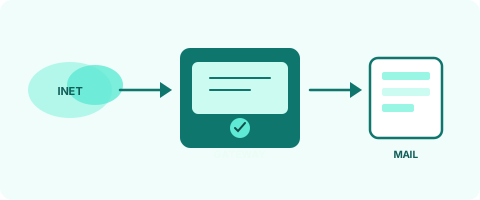
A real security gateway
Not an API add-on: MX traffic hits KBG Secure Mail first. Clean mail is relayed to your server.
- MX under your control DNS MX points at the gateway. Only your registered domains are accepted — no open relay.
- Inspect and quarantine SPF/DKIM/DMARC, content, attachments and behavior signals. Suspicious mail never reaches the inbox.
- Clean delivery Approved mail is delivered to MailEnable, Exchange Online or your existing server.
Why a corporate email security layer?
The mailbox alone does not stop every fraud or leak. KBG Secure Mail keeps policy in one place, holds suspicious mail before the user sees it, and gives each organization a panel that shows only its own traffic.

Fraud and identity
Lookalike domains, fake display names, payment language and a changed supplier account can be quarantined. A first-time external recipient and a sudden burst of new recipients stop for review.

Review and quarantine
Suspicious mail does not reach the inbox. Review, release or report it from the panel. Released mail gets link protection again.

Click-time protection
Links in unsigned mail open an approval page. On click, redirects, dangerous files and known malicious addresses are checked. A risky link does not open.

Archive and eDiscovery
Mail is kept by domain and mailbox and can be searched in the body and attachments. Higher plans add legal hold and export. You can also copy the archive to your own Google Drive or OneDrive.
Frequently asked questions
Short answers on setup, coverage and Plesk.
Does KBG Secure Mail replace my mail server?
No. Inbound mail passes through KBG Secure Mail first. Clean mail is delivered to Exchange Online, MailEnable or your existing server. Only domains you define are accepted.
What does click-time protection do?
A link in unsigned mail opens an approval page. On click, redirects and known malicious addresses are checked. A risky link does not open.
What does the free plan include?
Free shows core inspection and quarantine. Click-time protection, fraud signals, DLP and cloud archive unlock on higher plans.
Where is data stored?
Inspection and the archive run on your servers. You can also back the archive up to your own Google Drive or OneDrive.
How does Plesk integration work?
The extension starts with one domain. The customer connects it under SG Settings and opens the panel for that domain. Server connection and the license stay with the administrator. More domains are licensed on this site.
Is outbound mail protected too?
Yes. Outbound mail can be inspected for sensitive data, a first-time external recipient and a sudden burst. For inbound, the domain MX must point at KBG Secure Mail. Details are settled during setup.
See corporate protection for free
Create an account, add your domain and send inbound mail through KBG Secure Mail. DLP, cloud archive and eDiscovery unlock when the plan is raised.